What's in a meeting
Contract terms, pricing, performance reviews, customer data, plans nobody has announced yet. Often in the same hour.
Live meeting interpreter that runs on your PC
Nemma keeps every word on your PC.
No meeting bot. No recording. Nothing stored on a server.
Live interpretation for in-person and online meetings, into your language, as people speak. Your meetings never leave the room.
First 500 people get a founders price for the first year: Local $69, Pro $109. Nothing is charged now. English and Korean first, more languages on the way.
Drawn after the app's caption window. The meeting and the lines are examples written for this page, not a recording or a measurement.
Our principles
Most meeting tools send your conversation to a service to work. Nemma was built the other way around, and these promises shape every feature.
Speech recognition and translation run on your PC. Nothing is added to the call, and nobody gets an invite from a note-taker.
Audio is never recorded. Captions live in memory and are gone when the meeting ends, unless you choose to save notes yourself.
Unless you turn something on yourself, Nemma sends no audio, text or captions anywhere. Online meetings and the room alike.
Your meetings never pass through our servers, so we can't see or keep them. Even if you choose server translation, the app talks to the provider directly.
Once the models are downloaded, interpretation works without an internet connection. Pull the cable and the captions keep coming.
Our source code goes public at launch, so anyone can check what Nemma does. And with any network monitor you can see for yourself that nothing from your meeting goes out.
The one exceptionThe one exception is your choice: on a PC too slow to translate locally, you can have the recognized text (never your audio) translated on a server. It stays off unless you turn it on, and the app shows what is sent and where.
Why local
Contract terms, pricing, performance reviews, customer data, plans nobody has announced yet. Often in the same hour.
Cloud meeting tools record, upload and keep conversations on servers you don't control. Some have faced lawsuits over recording people without consent and over how meeting data is used.
It listens on your PC, shows captions, and lets go. No copy on someone else's server, so there is nothing to leak, hand over or train on.
In the room and online
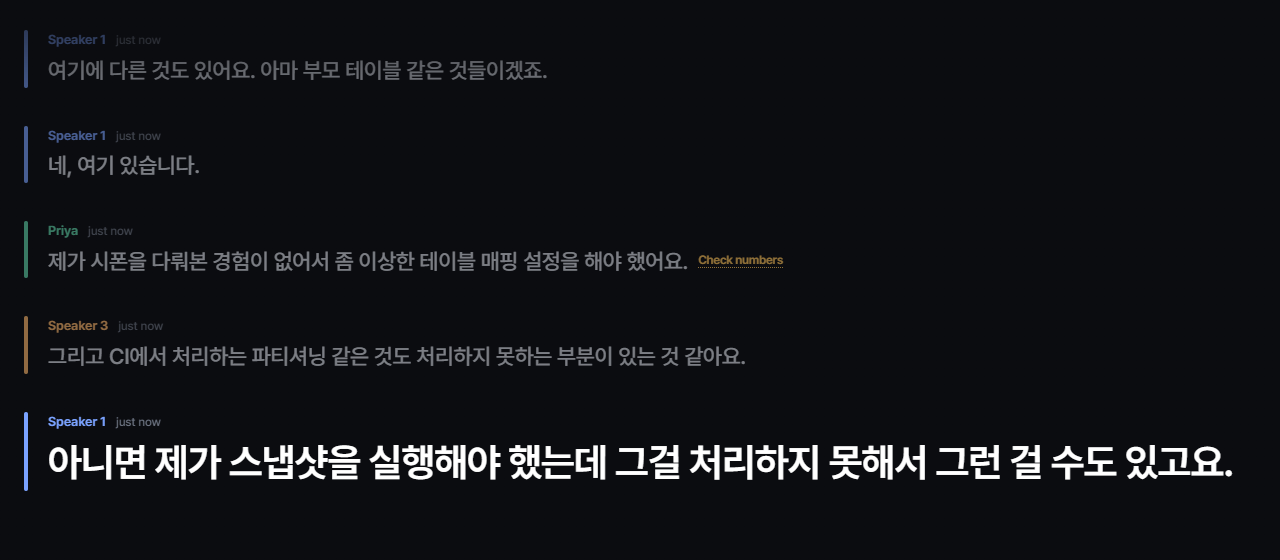
In-person meetings
Nemma listens through the microphone and shows the conversation around you in large, calm captions.
Screenshot from a pre-release build.
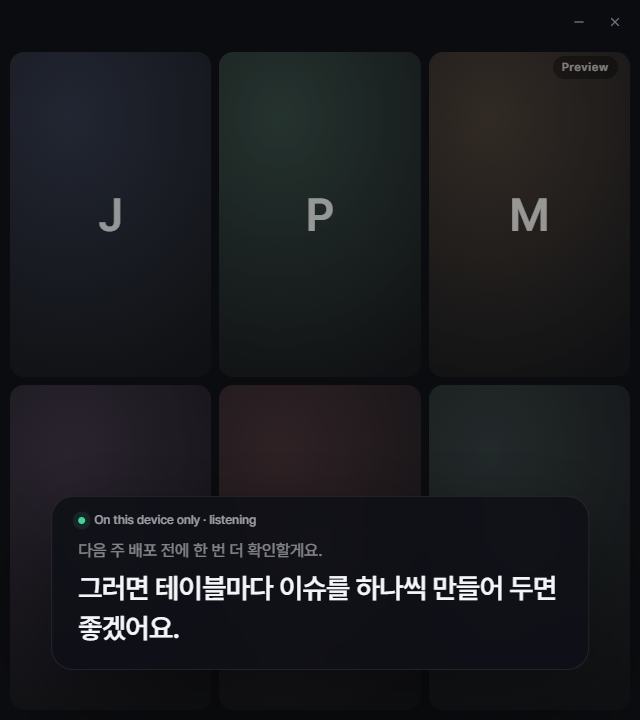
Online meetings
Nemma listens to the sound your PC plays, so it works with any meeting app or webinar. Nothing joins the call.
Screenshot from a pre-release build, with the app's preview meeting behind it.
Languages
Nemma is made to interpret any meeting into the language you think in. We add language pairs one at a time, and only when they're good enough for real meetings.
No dates yet. Join the Founders Circle to hear when your language is ready.
How it works
The speech and translation models are saved on your PC. After that, Nemma works without the internet.
Your PC's sound for online meetings, or the microphone for the room you're in.
A faint draft appears while someone speaks, then the finished sentence settles in. In our tests on a PC with a recent NVIDIA graphics card, it typically arrives in under a second.
Also inside
Dates, amounts and versions are compared with what was said, and so is every "not". A line that may be wrong is marked so you can check the original before you act on it.
A side panel keeps a summary, decisions and action items as the meeting goes. Saved only if you choose.
Packs for fields like finance, legal and manufacturing, plus your own names and terms. Paste the agenda to get names right.
Type what you want to say in your language and get a natural sentence in the meeting's language.
ProOne click brings back the last 30 seconds, so you can catch up without asking.
ProExperimentalNemma can also caption videos playing on your PC, starting with Korean videos in English. It's for personal viewing and still being tested.
Pricing
Everything on your PC
or $99 / year
Local, plus Pro tools
or $159 / year
The first 500 people who join before launch get the first year of a yearly plan for Local $69 (regularly $99) or Pro $109 (regularly $159), plus early beta access. Renews at the regular price after the first year. Nothing is charged now.
Try everything in Pro. Monthly or yearly, cancel online in one step. Prices in US dollars, plus sales tax where it applies.
Needs Windows 10 or 11, 16 GB of memory and a graphics card for translation. Mac is coming. Check your PC
Not your meetings. By default no audio, text or captions leave your device. The one exception is your choice: on a PC too slow to translate locally, you can have the recognized text (never your audio) translated on a server. It stays off unless you turn it on, and the app shows what is sent and where.
Model downloads, license checks and update checks go out without any meeting content. See the privacy summary.
English to Korean and Korean to English come first. Japanese, Chinese, Spanish and others are on the way, but we're not giving dates until each one is good enough for real meetings.
No. Nemma doesn't connect to meeting apps or invite anything. It listens to the sound your PC plays, or to the microphone in the room.
They may. Depending on your PC and meeting app, the caption window can show up in a screen share or recording. Move or close it before you share.
Yes. Machine interpretation isn't perfect. Lines where a number or a "not" may have changed are marked so you can check. For contracts, amounts and anything that matters, confirm directly.
It's courteous to say you're using live interpretation, and you should if you save notes. Your company's policies or local law may require it. This isn't legal advice.
Follow the meeting in your own language, and keep it in the room.